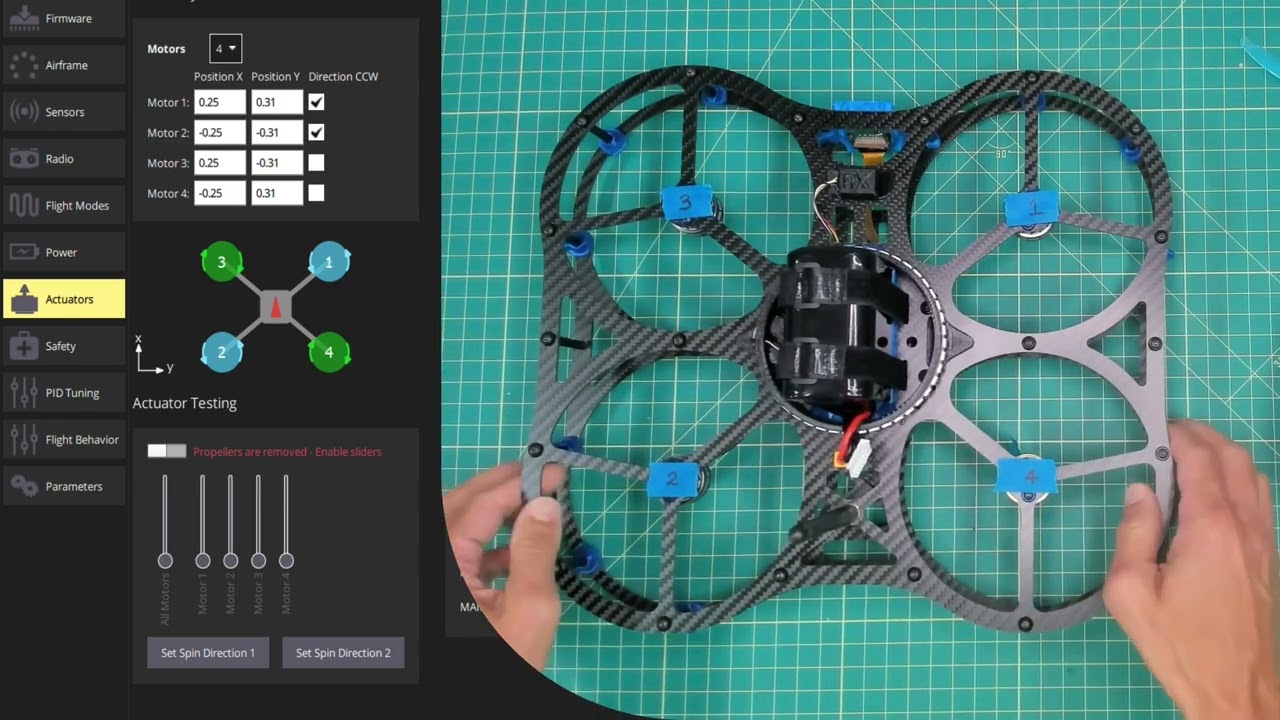
PX4 “Motor Position Coordinate System”
Before I purchase a drone development kit, I want to make sure I understand PX4 “Motor Position Coordinate System”
I want the ability to move the center of mass and update the flight controller.
image from the “PX4 Guide”
I have other question, but this one first. Can I do this with your drone?
Hi John, this is PX4 configuration task that you can review here:
Let me know if you want to dive into it further and happy to work through it with you.
Dennis,
Yes, at about 1:25 in the video, I can see the “Actuators Setup” with Motor Geometry. I can see the motor quadrantes for your drone. I can see that the motor distances are further in the Y Direction.
The on line Manual for PX4 shows an advanced tab in the top right corner. However, in your video I do not see this tab.
The basic form of motor geometry is good, will have access to the advanced setup on your drone?
I attached an image from the online manual. Shows the basic and advanced
“Motor Geometry: Multicopter
The image below shows the geometry setup for a quadrotor multicopter frame with and without advanced settings.”
John W
(attachments)
This is a QGC (QGroundControl) setting to toggle advanced on and off. Here is the default view:
Notice the Advanced checkbox in the top right. When I check it:
and the raw parameters can be set without the GUI if desired:
I hope this helps.
Yes, that’s great.
One more question.
I want to be able to place the drone in different static positions and read the accelerometer.
Yaw, Pitch, and Roll would be ok, but accelerometer vector data would be better.
Can I do that with QGC?
John W
Here is the IMU data from QGC:
PX4 has many different drivers that pull the sensor data from Pixhawk and feed it into the estimator. For example here is the driver for the IMC-42688-P that is on our DEXI drone. There are actually two of them:
Driver details can be found here:
Let me also mention that after a flight there are log files that can be uploaded to Flight Review: